> ## Documentation Index
> Fetch the complete documentation index at: https://docs.getwhys.io/llms.txt
> Use this file to discover all available pages before exploring further.
# Claude.ai, Desktop, and Code
> Connect GetWhys to Claude.ai, Claude Desktop, and Claude Code — including the GetWhys skill for your org.
Org-wide connector setup in Claude.ai typically flows through to **Claude Desktop** for users signed into the same Claude organization — but it does **not** configure Claude Tag in Slack. See [Org-wide setup is per surface](/integrations/mcp-setup#org-wide-setup-is-per-surface).
Complete the shared steps in [MCP Setup](/integrations/mcp-setup) first. For org-wide setup, [generate an Organization MCP API Token](/integrations/mcp-setup#generate-an-organization-mcp-api-token) with a label like `claude`.
## Recommended: org-wide connector
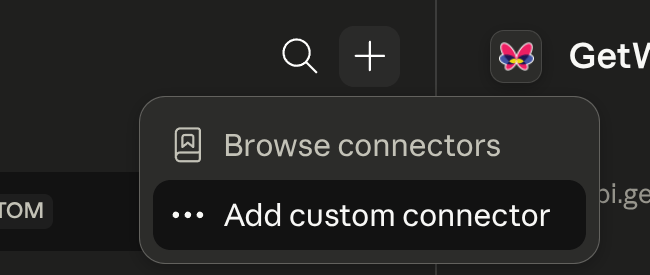
Set up a custom connector at [claude.ai/customize/connectors](https://claude.ai/customize/connectors) → **Add custom connector**:
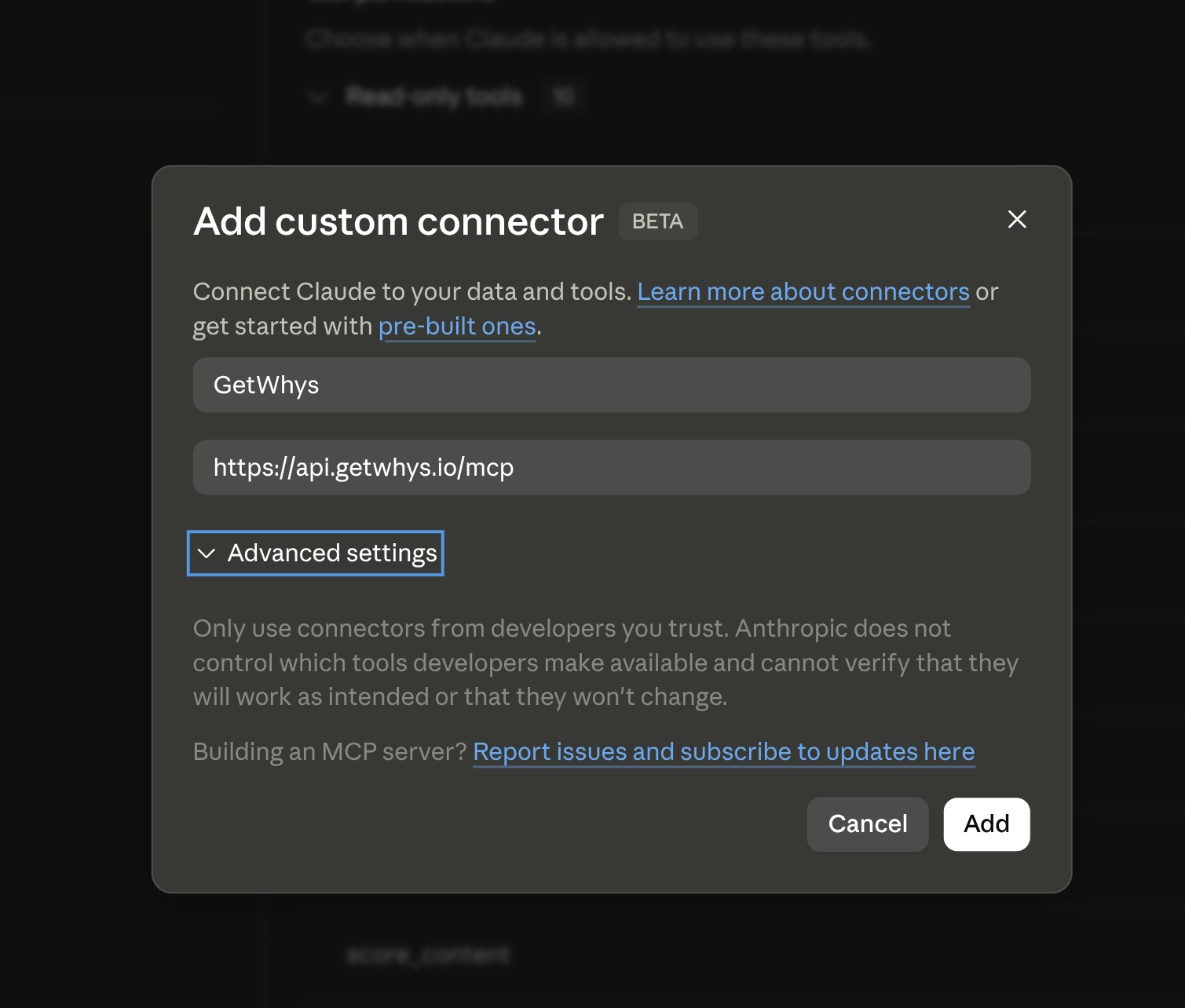
 Fill in a label and the GetWhys MCP server URL. Claude.ai's connector UI doesn't expose a field for a custom header on this flow, so use the [query-string fallback](/integrations/mcp-setup#authenticating-with-a-token-header-vs-query-string) rather than the header method:
```text theme={null}
https://api.getwhys.io/mcp?access_token=
```
Fill in a label and the GetWhys MCP server URL. Claude.ai's connector UI doesn't expose a field for a custom header on this flow, so use the [query-string fallback](/integrations/mcp-setup#authenticating-with-a-token-header-vs-query-string) rather than the header method:
```text theme={null}
https://api.getwhys.io/mcp?access_token=
```
 ## Alternative: individual connector (OAuth)
Same steps as above, but paste just `https://api.getwhys.io/mcp` with no token — you'll be sent to GetWhys to sign in and authorize with your own account.
## Claude Code CLI
**Using your GetWhys user authentication:**
```text theme={null}
claude mcp add --transport http getwhys https://api.getwhys.io/mcp
```
Then follow the steps in your browser to log in.
**Using an Organization MCP API Token:**
```text theme={null}
claude mcp add --transport http getwhys https://api.getwhys.io/mcp \
--header "Authorization: Bearer "
```
## Recommended: Installing the GetWhys skill for your whole Claude.ai org
Without the skill, Claude may not consistently know when to reach for GetWhys during a conversation. The skill gives Claude clear instructions for when to call GetWhys tools, what workflow to follow, and how to apply results — which makes GetWhys meaningfully more reliable in day-to-day use. Install it alongside the MCP connector for every org.
**The skill is a companion to the MCP server, not a replacement** — it won't do anything without the MCP connected.
1. **Download the skill.**
```text theme={null}
https://github.com/GetWhys-Engineering/agent-skills/releases/latest/download/validate-gtm-output.zip
```
Or pin to a specific version: `.../releases/download/vX.Y.Z/validate-gtm-output.zip`. You do not need to unzip it — upload the `.zip` as-is.
2. **One-time org setup (first install only).** Log in to claude.ai as an org admin → **Organization Settings** → **Skills** → enable both **Skills** and **Code execution & file creation**.
The GetWhys skill doesn't execute code or create files itself — it only guides Claude in calling GetWhys MCP tools. Code execution & file creation is a platform-level prerequisite for Claude's Skills feature generally, not something this specific skill uses.
3. **Add the skill.** Still under **Organization Settings → Skills**, find **Organization skills** → **+ Add** → select the `validate-gtm-output.zip` you downloaded.
**Updating later:** re-download the latest zip and repeat step 3. If you pinned a specific version, bump the URL and re-upload.
## Verify
Ask Claude the [verify prompt](/integrations/mcp-setup#verify-the-connection): "Who am I in GetWhys?"
## Next: Claude Tag in Slack
If you also want GetWhys inside Anthropic's `@Claude` in Slack, that is a separate setup — see [Claude Tag](/integrations/mcp-claude-tag). That is not the [GetWhys Slack bot](/integrations/slack).
## Alternative: individual connector (OAuth)
Same steps as above, but paste just `https://api.getwhys.io/mcp` with no token — you'll be sent to GetWhys to sign in and authorize with your own account.
## Claude Code CLI
**Using your GetWhys user authentication:**
```text theme={null}
claude mcp add --transport http getwhys https://api.getwhys.io/mcp
```
Then follow the steps in your browser to log in.
**Using an Organization MCP API Token:**
```text theme={null}
claude mcp add --transport http getwhys https://api.getwhys.io/mcp \
--header "Authorization: Bearer "
```
## Recommended: Installing the GetWhys skill for your whole Claude.ai org
Without the skill, Claude may not consistently know when to reach for GetWhys during a conversation. The skill gives Claude clear instructions for when to call GetWhys tools, what workflow to follow, and how to apply results — which makes GetWhys meaningfully more reliable in day-to-day use. Install it alongside the MCP connector for every org.
**The skill is a companion to the MCP server, not a replacement** — it won't do anything without the MCP connected.
1. **Download the skill.**
```text theme={null}
https://github.com/GetWhys-Engineering/agent-skills/releases/latest/download/validate-gtm-output.zip
```
Or pin to a specific version: `.../releases/download/vX.Y.Z/validate-gtm-output.zip`. You do not need to unzip it — upload the `.zip` as-is.
2. **One-time org setup (first install only).** Log in to claude.ai as an org admin → **Organization Settings** → **Skills** → enable both **Skills** and **Code execution & file creation**.
The GetWhys skill doesn't execute code or create files itself — it only guides Claude in calling GetWhys MCP tools. Code execution & file creation is a platform-level prerequisite for Claude's Skills feature generally, not something this specific skill uses.
3. **Add the skill.** Still under **Organization Settings → Skills**, find **Organization skills** → **+ Add** → select the `validate-gtm-output.zip` you downloaded.
**Updating later:** re-download the latest zip and repeat step 3. If you pinned a specific version, bump the URL and re-upload.
## Verify
Ask Claude the [verify prompt](/integrations/mcp-setup#verify-the-connection): "Who am I in GetWhys?"
## Next: Claude Tag in Slack
If you also want GetWhys inside Anthropic's `@Claude` in Slack, that is a separate setup — see [Claude Tag](/integrations/mcp-claude-tag). That is not the [GetWhys Slack bot](/integrations/slack).